
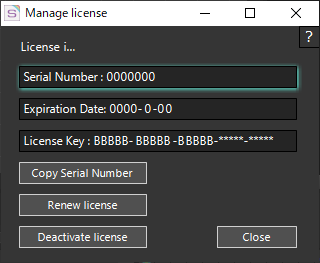
This window is used to manage the license status of “OPTPiX SpriteStudio”.
| Serial Number |
The serial number of the “OPTPiX SpriteStudio” currently in use. |
|---|---|
| Expiration Date: |
Displays the date your “OPTPiX SpriteStudio” license expires. |
| License Key |
You are viewing the license keys for “OPTPiX SpriteStudio” that you are currently using. |
| Copy Serial Number |
Click to copy the Serial Number to the clipboard. |
| Renew license |
Your “OPTPiX SpriteStudio” license will be updated. |
| Deactivate license |
Your “OPTPiX SpriteStudio” license will be Deactivate. |
| ? |
Open a web browser and open this page. |
| Close |
Close the Manage License Window. |
Related Pages
- How to Uninstall
Provides uninstall instructions. - I want to know how to handle errors that occur when I activate or disable a license
Describes what to do if an error occurs when you activate or deactivate a license. - How to Deactivate License
Describes how to Deactivate a license.